


Hyatt Inclusive Collection
4.3172.00 Reviews
App Specs
- Version
- 2.10.3
- Updated On
- License
- Free
- Downloads
- 1,000,000+
- Developer
- STAY App
- Categories
- Travel & Local
- Platform
- Android
Screenshots
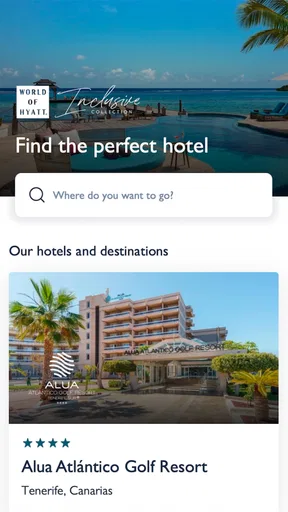
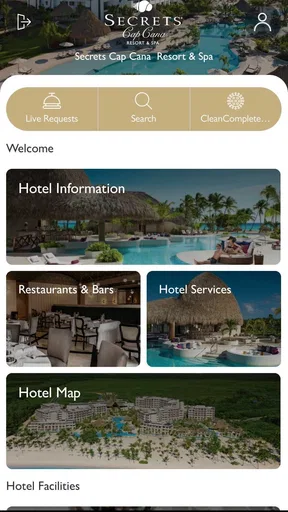
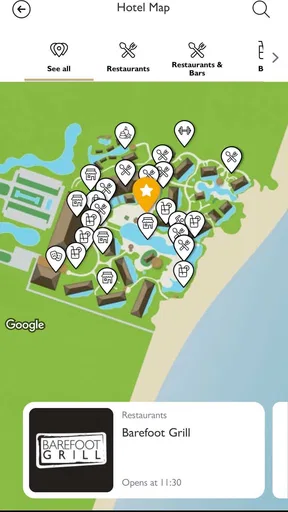
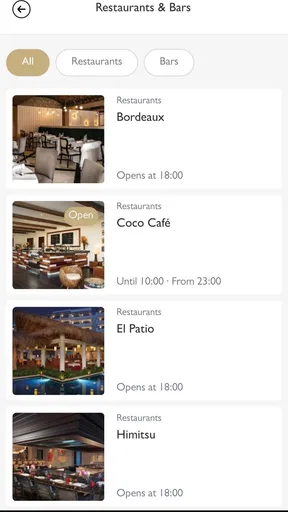
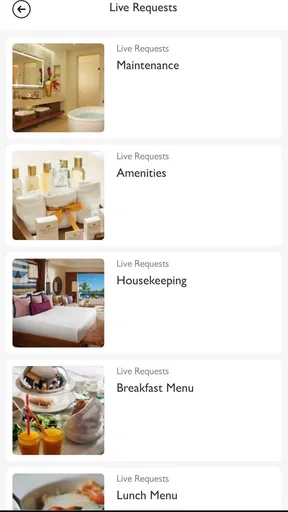
 Analysis by AppCompare
When I review a resort companion app, I pay less attention to the welcome screen and more attention to what happens when I am tired, carrying luggage, or trying to solve a small problem without standing in a queue. Hyatt Inclusive Collection is built for that exact travel moment: it brings mobile resort services into one place for guests staying within the Hyatt Inclusive Collection environment. I found the idea useful because an all-inclusive stay can involve several moving parts, and having resort-related information on a phone is usually easier than keeping track of paper notices, conversations, and changing plans.
This is a free Travel & Local app from STAY App, aimed at Everyone rather than a narrow age group. It has reached over a million installs and holds a 4.3 average from around 5,700 ratings, which suggests that many travelers find the concept worthwhile while still leaving room for different experiences across resorts. My overall view is positive, but with an important qualification: the app is most valuable when your particular resort is properly connected to it. It is not a universal travel planner, and it cannot replace the resort’s own staff, policies, or on-site systems.
Where the experience can become confusing
The first point where I would expect some users to hesitate is before they even start exploring. A resort service app depends on recognizing the right property and the right stay context. If the screen does not immediately show the resort you expected, or if the available content looks incomplete, it is tempting to assume the application is broken. In practice, the problem may be that the stay has not been matched correctly, the resort has not exposed every service through the app, or the guest is looking at the wrong property entry.
That distinction matters. A normal map app can still show a hotel’s location even when nothing else is connected. A general booking app can display a reservation independently of the resort’s internal service system. Hyatt Inclusive Collection sits closer to the property-service layer, so its usefulness depends more heavily on the relationship between the app and the resort where you are staying.
I would begin by checking the property name and the basic stay details shown inside the app before assuming that a missing option is a technical fault. If the resort identity is correct but a particular service is not visible, I would ask the front desk whether that service is handled through the app at that property. That is a much faster test than repeatedly closing and reopening the application.
Another common source of friction is expecting the app to behave like a complete holiday organizer. It is better understood as a mobile doorway to resort services. It may help you interact with the property during your stay, but it is not the right place to manage every part of a trip, such as flights, independent excursions, transport outside the resort, or plans at unrelated destinations. I keep a regular travel app or email confirmation available for those jobs.
The most useful mindset is to treat this as a resort companion, not a replacement for every travel tool on your phone. That simple expectation prevents a lot of disappointment. When I use it for property-related tasks and information, the purpose feels clear. When I expect it to act like a broad vacation marketplace, it feels much more limited.
Worth Reading Before You Choose

EA SPORTS FC Mobile 26 Is a Bigger Football Game, but It Takes Time

Flipboard Shows What News Apps Must Do Beyond the Feed

Switching to Android Auto Means Rethinking Your Driving Routine

Google Calendar Makes a Crowded Week Easier to Manage

Ludo King Makes the Most of the Minutes Between Plans

Baby Panda World Brings Quick Play to Modern Phones, but Its Game Library Feels Busy
Why resort context changes the experience
All-inclusive properties often have their own rhythm. Dining arrangements, activities, service requests, and daily decisions can be tied to the specific resort rather than to a standard hotel interface. That makes a dedicated app potentially more convenient than searching the web for general information, because the relevant details are intended to be presented in the context of the stay.
At the same time, that specialization creates a trade-off. A general search engine gives me breadth and independence, while Hyatt Inclusive Collection should give me a more focused route into the resort experience. If I am comparing restaurants across an entire city, I would choose a conventional travel service. If I am already at a participating inclusive resort and want property-related help, this app makes more sense.
Setup checks that save time later
I recommend doing a quick setup check before relying on the app during a busy day. First, confirm that the installed application is the current release shown in the store: version 2.10.3. The app was released on April 14, 2021, and supports Android 8.0 or later, so compatibility is broad for many Android phones, but older devices can still behave differently depending on their condition and available space.
Next, open the app while you have a stable connection and look through the property-specific areas that are available. I prefer doing this before leaving the room because it gives me time to notice whether the resort is recognized and whether the information I expect is present. A short check at the start can be more useful than discovering a problem when I am already late for an activity or trying to arrange something from a crowded lobby.
I also make sure the phone itself is ready. A nearly full device, an outdated operating system, or aggressive battery management can interfere with many apps, even when the app’s own installation is fine. I do not change every phone setting automatically; I simply make sure the application can open normally, the screen is readable, and the device has enough battery for the situations in which I plan to use it.
Because this is a resort service tool, I would not judge it solely from the first launch at home. Some of its value may only become clear once the relevant property context is available. Before traveling, I use the app to become familiar with its layout, but I reserve my final judgment for the point when I am connected to the actual stay environment.
A practical pre-arrival routine
My preferred routine is simple. I install the app through the official store, open it once on a reliable connection, confirm that it starts correctly, and note where the resort-related information appears. I then keep my booking confirmation and the resort’s direct contact details accessible separately. This is not redundant: an app can be convenient, while a confirmation message or staff member remains the better fallback when something is urgent.
I would also avoid uninstalling and reinstalling immediately if the first screen is confusing. Reinstallation can remove local state without solving a mismatch on the service side. It is more sensible to verify the property context, check the connection, and ask the resort whether the service is available through the application.
The age rating of Everyone makes the app approachable for a broad group of travelers, including families sharing holiday planning. Still, ease of use is not the same as complete accessibility for every person or device. A family may find the app helpful for keeping resort-related information in one place, but I would still make sure everyone knows the room details and the front desk location in case a phone is unavailable.
Recovering when a workflow stops halfway
The most frustrating app problems are rarely dramatic crashes. More often, a screen loads partly, a request appears not to finish, or I am unsure whether tapping again will create a duplicate action. My first rule is to pause before repeating anything. If the app is connected to a resort service, duplicate attempts may create confusion even when the interface does not immediately show a clear confirmation.
I usually take a screenshot or note the last visible step, then return to the previous screen once rather than pressing the same control several times. If the app returns to a normal state, I check whether the requested item or confirmation is already visible. This small habit is especially useful when the connection is weak and the interface takes longer to update.
If the screen remains stuck, I move through a conservative recovery sequence: check the connection, close and reopen the app, and try again later from a more reliable location. I would not clear all application data as a first response, because that can remove useful local information and may make the original problem harder to understand. Restarting the phone is reasonable when other apps are also behaving strangely, but it should not be presented as a guaranteed fix.
When the issue concerns a service that affects the current stay, I contact the resort directly instead of waiting indefinitely. The application is a convenience layer; it should not become a barrier between me and staff. If I need an immediate answer about a reservation, a room matter, or a time-sensitive request, the front desk or the relevant resort team is the practical escalation route.
How I avoid losing track of a request
I keep a simple mental record of what I asked for, roughly when I submitted it, and whether the app displayed any acknowledgement. I do not rely on memory alone when the day is busy. If a service has not appeared to progress after a reasonable interval, I ask staff to verify it rather than submitting the same request repeatedly.
This workflow is one of the app’s less obvious trade-offs. Digital access can reduce the need for a conversation, but it can also make the status of a request feel less personal or less clear. A staff member can interpret a complicated situation immediately; an app can be faster for a straightforward one. I choose between them based on urgency and complexity rather than assuming the phone is always better.
For families, I would designate one person to handle app-based resort tasks when possible. Multiple people using separate phones can make it difficult to know whether something has already been requested. The app may be free to install, but the real cost of poor coordination is time lost during a holiday.
When the application is not the real cause
It is easy to blame the app when resort information is missing, but several outside factors can produce the same impression. The property may use different channels for different services. The guest’s stay may not be recognized yet. The phone may be connected to a network that is technically active but too unstable for a smooth session. Or the issue may be limited to one resort-specific function rather than the whole application.
I test this by separating the problem into small questions. Does the app open? Does the correct resort appear? Is the difficulty limited to one section? Can another ordinary app use the same connection? Is the request urgent enough that I should speak to staff now? These checks help me avoid wasting time on a full reinstall when the real answer is simply that the resort handles that matter elsewhere.
The developer, STAY App, positions this product around mobile resort services, so the app’s performance should be judged in that setting rather than as a standalone source of destination information. A general travel app may feel more dependable for maps, independent bookings, and city research because those functions do not depend on a particular property’s service setup. Hyatt Inclusive Collection has a narrower job, and that narrower job can be an advantage when it matches the stay.
There is also a human limitation that no interface can remove. If a resort rule, schedule, or availability changes on site, the app may not be the fastest place to understand the reason. Staff can explain exceptions and alternatives in a way a compact mobile screen cannot. I see the app as a useful first stop, not as the final authority for every unusual situation.
Who benefits most, and who should skip it
I would recommend trying it if you are staying at a Hyatt Inclusive Collection property and prefer handling routine resort interactions from your phone. It is particularly sensible for travelers who dislike carrying printed information, want to check resort-related details while moving around the property, or are coordinating a family day and need a central digital reference.
I would be more cautious if your trip is mostly independent. If you are staying outside the relevant resort environment, spending the day in a city, or looking for broad comparisons between hotels and attractions, a general travel application will be more useful. Installing this one in the hope that it will replace maps, booking tools, messaging, and destination research would add clutter without solving the main problem.
It may also be the wrong choice for someone who wants every service to be explained in person. The app can reduce small conversations, but some travelers value direct confirmation more than speed. In that case, I would keep it available as a backup while continuing to use the front desk for anything complicated or important.
My practical verdict after using it as a resort tool
Hyatt Inclusive Collection is a focused, free Travel & Local app that makes the most sense before and during a stay at a connected Hyatt inclusive property. I like its basic role because resort services are easier to approach when they are gathered in a phone-based experience rather than scattered across notices and conversations. The 4.3 average and more than a million installs indicate that it has found a real audience, while the experience still depends on how well the individual resort and the guest’s phone work together.
My strongest recommendation is to install it early, open it on a dependable connection, confirm the property context, and keep a non-app fallback for urgent matters. That preparation handles the most likely friction without turning troubleshooting into a project. If a workflow pauses, avoid duplicate taps, check whether the request already registered, and involve resort staff when timing matters.
The current version, 2.10.3, supports Android 8.0 or later, and the Everyone rating makes it easy to consider for a wide range of travelers. Those details make it approachable, but they do not change the central decision: the app is worthwhile when your holiday is centered on the participating resort’s own services.
In my experience, I would keep it installed for that kind of trip, but I would not use it as my only travel companion. Its real strength is focused resort convenience; its real limitation is that convenience depends on the property context. Used with realistic expectations and a sensible backup, it can remove small points of friction from an all-inclusive stay. Used as a universal travel planner, it is likely to feel narrower than expected.
Pros
- Easy access to resort bookings across Hyatt’s inclusive brands.
- Useful filters help compare destinations
- dates
- and available properties.
- Loyalty members can manage reservations and World of Hyatt benefits.
- Resort details include dining
- activities
- amenities
- and location information.
- Mobile booking makes it convenient to organize an all-inclusive getaway.
Cons
- Some rates and packages may be difficult to compare at a glance.
- Availability and pricing can change frequently during the booking process.
- The app may promote Hyatt properties more than independent alternatives.
- Certain resort details may vary by destination and require confirmation.
- A Hyatt account may be needed for the smoothest booking experience.
FAQs for Hyatt Inclusive Collection
What is Hyatt Inclusive Collection?
Hyatt Inclusive Collection is a group of all-inclusive resorts available through Hyatt’s portfolio, including brands such as Secrets, Dreams, Zoëtry, Breathless, and Sunscape in selected destinations. The related app or booking experience helps travelers explore resorts, review amenities, compare room options, check rates, and manage reservations. Availability, services, and brand features can vary by property and destination.
What can I do through the Hyatt Inclusive Collection app or website?
After signing in or searching as a guest, you can browse participating all-inclusive resorts, view photos and room details, check restaurants and activities, compare available dates, and make or manage a reservation. Depending on the property, you may also find information about spa services, excursions, resort entertainment, transportation, and special offers. Some features may require an active booking.
Are meals, drinks, and activities included at Hyatt Inclusive Collection resorts?
Most participating Hyatt Inclusive Collection resorts operate under an all-inclusive concept, which commonly covers meals, selected beverages, resort activities, entertainment, and certain amenities. However, inclusions are not identical everywhere. Premium wines, specialty experiences, spa treatments, excursions, private transfers, and some restaurants or services may cost extra. Always review the exact inclusions for your chosen resort before booking.
Do I need a Hyatt account or World of Hyatt membership to use it?
You can generally browse resorts and review basic information without creating an account. An account or World of Hyatt membership can make it easier to save preferences, manage reservations, access loyalty benefits, and keep booking details organized. Membership benefits and points eligibility may depend on the specific resort, rate, promotion, and booking channel, so check the terms shown during reservation.
Is Hyatt Inclusive Collection suitable for families, couples, and adults-only vacations?
The collection includes different resort brands designed for different travel styles. Some properties focus on romantic escapes or adults-only stays, while others welcome families and provide children’s clubs, family activities, and connecting accommodation options. Before downloading or booking, check the resort’s age policy, available facilities, destination, transfer requirements, and current activity schedule to ensure it matches your group’s needs.


